

Most enterprise marketing teams treat event day as the finish line. Attendees leave, badges get recycled, and the data collected sits in a spreadsheet waiting for someone to act on it. The role of event data in CRM is far more consequential than that. When behavioral records from your events flow directly into your CRM, they become the connective tissue between event spend and measurable pipeline contribution. This guide explains how to capture, integrate, and govern that data so it drives real business outcomes, not just post-event reports.
Table of Contents
- Understanding event data and its CRM role
- How to integrate event data into CRM effectively
- Common pitfalls and how to avoid them in event data syncing
- Building resilient event data architecture for CRM success
- Leveraging event data in CRM to maximize event ROI and engagement
- Rethinking event data's role in CRM: beyond the basics
- How OAK EVENTS supports enterprise event data-CRM integration
- Frequently asked questions
Key Takeaways
| Point | Details |
|---|---|
| Event data deepens CRM insight | Behavioral event data complements traditional customer info by revealing real actions and engagement. |
| Integration enables ROI tracking | Native API connections let you automatically link event attendance to sales outcomes in CRM. |
| Data quality is critical | Governance, schema versioning, and unique IDs prevent data drift and duplication. |
| Avoid post-event data pitfalls | Timely syncing and contextual lead qualification prevent lost or ignored sales opportunities. |
| Event data informs engagement | CRM-enriched event data helps personalize follow-ups and improve pipeline acceleration. |
Understanding event data and its CRM role
Event data is not simply a list of who showed up. Event data is behavioral data capturing what customers do at every touchpoint, and it is foundational for analytics, activation, and AI-driven experiences. That means every session attended, booth visited, poll answered, and resource downloaded is a signal that tells you something meaningful about a prospect's interests and intent.
Your CRM already holds demographic and transactional information: company size, industry, purchase history, contact details. What it typically lacks is behavioral context. Event data fills that gap. A contact who attended three sessions on a specific product line and spent 20 minutes at a demo booth is a very different prospect from one who registered but never showed. Without event data in your CRM, your sales team cannot tell the difference.
The event data significance in CRM becomes clear when you map it to specific use cases:
- Customer journey mapping: Knowing which events a contact attended and in what sequence helps you understand where they are in the buying process.
- Personalization: Sales reps can reference specific sessions or interactions in follow-up conversations, making outreach more relevant.
- Sales prioritization: Engagement scores built from event interactions help sales focus time on the most interested prospects.
- AI-driven insights: Clean, structured event data feeds machine learning models that predict conversion likelihood and recommend next best actions.
The role of data in acquisition is well established across marketing functions, and event data is one of the richest sources available. But it only delivers value when it is clean, consistently structured, and governed from the start. Tracking event success metrics alongside behavioral data gives you a complete picture of both operational performance and audience engagement.
Having defined event data, next we explore how integrating it into CRM enables tangible business benefits.
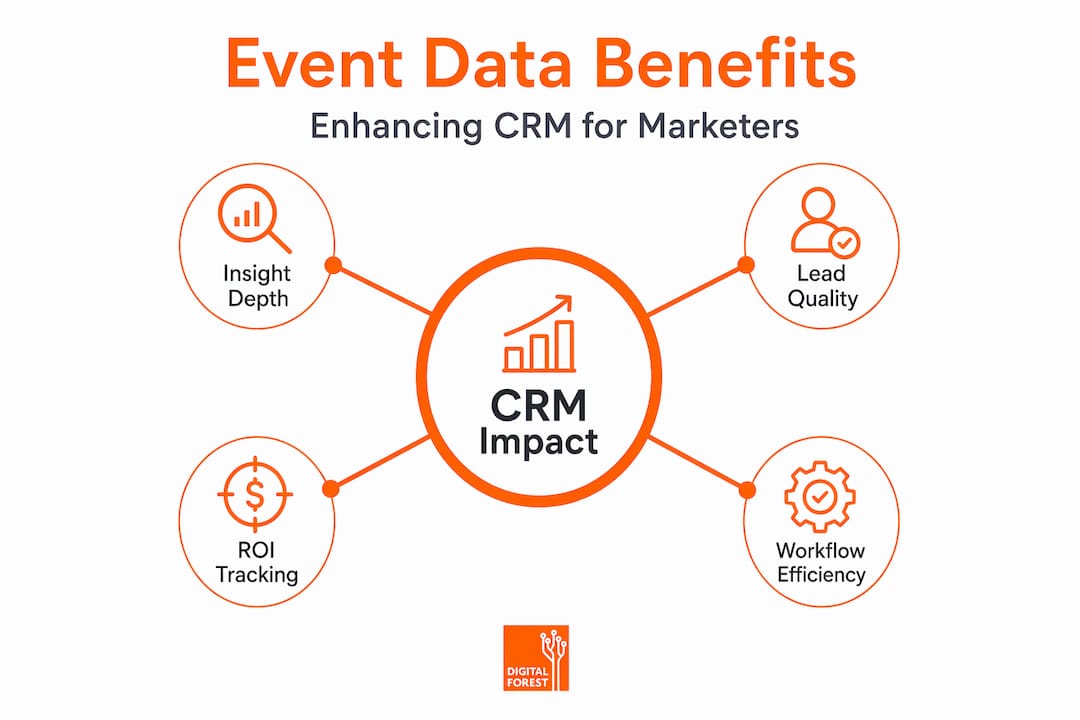
How to integrate event data into CRM effectively
Integration is where most enterprise teams either get this right or lose the value entirely. A manual export-and-import workflow introduces delays, errors, and gaps that erode data trust. Automated, well-architected integration is the standard to aim for. Here is a practical sequence for getting it right:
- Capture registration data at the source. Your event platform should collect structured fields at registration: name, company, role, and any qualifying questions. These map directly to CRM contact and lead records.
- Track attendance and engagement in real time. Check-in data, session scans, app interactions, and poll responses should be captured as discrete events with timestamps and unique attendee IDs.
- Use native APIs or custom webhooks to automate data flow. Manual exports create lag. Integrating event data with Salesforce via native APIs attributes closed deals back to specific events, enabling revenue tracking over a six-month window.
- Normalize and deduplicate before writing to CRM. A single attendee may exist in multiple systems under slightly different email formats. A normalization layer that matches on unique IDs prevents duplicate records from polluting your CRM.
- Map event properties to CRM fields deliberately. Session topic attended should map to a product interest field. Dwell time at a booth should update an engagement score. Every data point needs a destination and a purpose.
- Validate data post-sync. Run automated checks to confirm record counts match, required fields are populated, and no null values have slipped through.
When choosing event platforms for enterprise use, CRM integration capability should be a primary evaluation criterion, not an afterthought.
Pro Tip: Establish a "living" tracking plan, a shared document that defines every event property, its data type, acceptable values, and the team member responsible for it. Without clear ownership, schemas drift over time and your analytics become unreliable.
With integration practices defined, we now consider common pitfalls and nuances to navigate for reliable event-CRM data.

Common pitfalls and how to avoid them in event data syncing
Even well-intentioned integration efforts run into predictable problems. Knowing them in advance saves you from discovering them after a major event when sales is waiting on qualified leads.
The most frequent issues include:
- Duplicate contacts: When registration, check-in, and follow-up tools are separate, the same person can appear multiple times with slightly different data. Duplicate records from fractured tools require unique IDs and normalization layers to maintain sales data trust.
- Missing engagement context: Syncing only registration data without attendance or interaction records leaves sales with an incomplete picture. A registrant who never attended should not receive the same follow-up as someone who stayed for the full day.
- Batch processing delays: Nightly data syncs mean sales teams may not see event leads for 12 to 24 hours. In that window, competitors can reach out first.
- Undefined lead ownership: When no one is assigned to route event leads, they sit in a queue and go cold. Clear routing rules need to be built into the workflow before the event runs.
- No qualification layer: Not every attendee is sales-ready. Without a structured handoff protocol between marketing and sales, unqualified contacts flood the pipeline and erode trust in event-sourced leads.
Pro Tip: Design your event-to-CRM workflow with real-time syncing as the default, not the exception. Pair it with automated lead routing rules that assign records based on territory, company size, or engagement score immediately after sync.
Enriching CRM records with contextual data captured during interactions, such as notes from booth conversations or session Q&A participation, adds qualitative depth that structured fields alone cannot provide. This is where participant engagement techniques that encourage interaction also serve a data capture function.
Having seen common obstacles, we now focus on event data quality foundations critical for sustainable CRM insights.
Building resilient event data architecture for CRM success
Data quality is not a one-time cleanup project. It is an ongoing operational commitment. The architecture you build around event data determines whether your CRM insights remain trustworthy six months after an event or degrade into noise.
Event tracking architecture with schema validation, versioning, and governance prevents data drift and ensures reliable analytics over time. The key architectural elements to implement include:
- Consistent naming conventions: Use the same format for every event property across all tools. "session_attended" should never appear as "Session Attended," "sessionAttended," or "session attended" in different systems.
- Separation of identity and context: Store who attended separately from what they did. This makes it easier to join datasets and avoids overloading contact records with event-specific fields.
- Schema validation: Enforce property types and required fields at the point of capture. A data layer best practices guide can help you set up validation rules that reject malformed data before it reaches your CRM.
- Operational metadata: Every event record should carry a unique event ID, the data origin (which tool generated it), consent status, and schema version. This makes debugging and compliance audits far less painful.
Here is a comparison of poor versus best practices in event data implementation:
| Dimension | Poor practice | Best practice | Impact on CRM |
|---|---|---|---|
| Naming conventions | Inconsistent across tools | Standardized schema enforced at capture | Reliable field mapping and reporting |
| Deduplication | Manual, post-event cleanup | Automated unique ID matching at sync | Clean contact records, sales trust |
| Schema versioning | No versioning, ad hoc changes | Versioned schemas with change logs | Traceable data lineage, audit-ready |
| Engagement properties | Registration only | Dwell time, session topics, interactions | Rich lead scoring and personalization |
| Data ownership | No assigned owner | Named owner per event schema | Accountability, faster issue resolution |
Ongoing governance activities should include quarterly schema audits, code reviews before new event properties are added, documentation updates after each event, and a named owner for every data stream. Explore event management resources to find frameworks that support this kind of structured approach.
With sound architecture in place, we can now translate event data power into actionable CRM strategies for maximum ROI.
Leveraging event data in CRM to maximize event ROI and engagement
Integrated event data is only valuable if you act on it. Here are the most effective ways to put it to work inside your CRM:
- Prioritize leads by engagement score. Assign point values to event interactions: attending a session scores higher than registering, requesting a demo scores higher than attending. Sales works the highest-scored contacts first.
- Personalize follow-up communications. Reference specific sessions attended or topics engaged with in outreach emails. Generic follow-ups get ignored. Contextual ones get replies.
- Feed event engagement into CRM lead scoring models. Behavioral signals from events are among the strongest intent indicators available. Integrating them into your existing scoring model improves accuracy without rebuilding it from scratch.
- Optimize future event design based on behavioral patterns. If session attendance data shows that a particular topic drew 80% of your highest-value prospects, that topic belongs in a more prominent slot next time.
- Close the attribution loop. Automatic revenue attribution via CRM dashboards accelerates pipeline visibility and sales alignment, proving true event ROI to stakeholders who control budget decisions.
The difference between running events with and without CRM-integrated data is measurable:
| Metric | Without event data integration | With event data integration |
|---|---|---|
| Sales cycle length | Standard, no event context | Shorter, reps have behavioral context |
| Lead qualification accuracy | Based on demographics only | Behavioral signals improve precision |
| Engagement score reliability | Estimated or absent | Grounded in actual event interactions |
| Follow-up personalization | Generic messaging | Session and interaction-specific outreach |
| ROI measurement | Manual, delayed, incomplete | Automated, near real-time attribution |
Tracking key event KPIs alongside CRM pipeline data gives you a complete view of how events contribute to revenue, not just attendance numbers.
Rethinking event data's role in CRM: beyond the basics
Here is the uncomfortable truth most event teams do not want to hear: capturing event data is the easy part. The hard part is everything that comes after. Governance, integration, ownership, and continuous improvement are where most enterprise programs fall short, and where the real competitive advantage lives.
We have seen organizations invest significantly in event technology, collect thousands of behavioral data points, and then fail to act on any of it because the data never made it into the CRM in a usable form. Poor quality event data does not just fail to help. It actively misleads. Sales teams that receive duplicate, decontextualized, or stale leads from events stop trusting event-sourced data entirely, which is a problem that takes months to repair.
The lesson from enterprise event programs that get this right is consistent: they treat event data as an evolving asset, not a one-time deliverable. They assign schema owners. They run post-event data audits. They update their tracking plans before each new event format is introduced.
"True event ROI requires event data flowing into CRM for automatic revenue attribution, not manual effort." — Nitish Verma
When event data is governed well and integrated cleanly, event management shifts from a tactical line item to a strategic revenue driver. That shift changes how leadership views event budgets, how sales views event leads, and how marketing demonstrates its contribution to the business.
The engagement techniques you use during events are only as valuable as the data they generate and how well that data is used afterward. Think of your event data strategy as something that needs tending between events, not just during them.
How OAK EVENTS supports enterprise event data-CRM integration
Enterprise event programs need more than a registration tool. They need a platform built to handle the full data lifecycle from first registration to post-event CRM sync.
OAK EVENTS is designed specifically for enterprise organizations in media, technology, and related sectors, offering native CRM integrations, automated data syncing, and a data architecture that supports the governance practices described throughout this guide. The platform handles in-person, virtual, and hybrid events with equal depth, capturing behavioral engagement data across all formats and making it available for CRM attribution without manual reconciliation. For teams managing events in media and tech, OAK EVENTS provides the structured, branded, and measurable event infrastructure that turns event spend into demonstrable pipeline contribution.
Frequently asked questions
What types of event data should I sync to my CRM?
You should sync registration details, attendance records, session participation, engagement metrics like dwell time, and any qualifying interactions captured at the event. Including properties like dwell time and booth interactions in CRM prevents data quality degradation and gives sales and marketing teams the context they need.
How can event data improve sales follow-up?
Event data enriches CRM leads with behavioral context and engagement scores, enabling sales to prioritize warm leads and tailor conversations with relevant insights. High-engagement attendee data handed to sales results in faster deal closures because reps know exactly what each prospect cared about.
What are common challenges in syncing event data to CRM?
Challenges include data duplication from multiple source tools, loss of interaction context when only registration data is synced, delays in data availability from batch processing, and lack of structured qualification workflows. Data fragmentation and duplication cause sales teams to distrust event leads due to inconsistent records.
How important is event data governance for CRM integration?
Governance is critical. Without it, schema drift degrades data quality over time and makes cross-event comparisons unreliable. Governance mechanisms like schema validation and code review prevent data drift and ensure your CRM insights remain trustworthy across multiple event cycles.
Can integrating event data with CRM automate ROI measurement?
Yes. Seamless integration via native APIs allows automatic attribution of revenue and pipeline influence to specific events, eliminating manual reconciliation. Native API integration between event platforms and Salesforce automates revenue attribution to events over a six-month window, giving leadership timely and accurate ROI data.